

With the best book formatting software, your book writing journey becomes a worthwhile goal ONLY. Why did I say so?
The reason is that the journey from writing your thoughts on paper (or any other writing tool) to turning it into a book is more complex than many would have you believe.
Especially when it comes to formatting, many beginners find themselves at a crossroads. This is where book formatting software comes into play, and believe me, it’s a game-changer!
With it, not only can you have a great book format, but you’ll also find yourself effortlessly creating your book. This software waves a magic wand, transforming your manuscript into a professional-looking publication.
In this article, I have ranked and reviewed the best book formatting software for beginners and experienced authors, which will help you begin or scale your book writing journey.
You want to learn this badly, and I’m here to guide you.
RECOMMENDED: Best Book Marketing Tools
Why Use Book Formatting Software?
As I mentioned above, book formatting may be challenging for beginners.
As a professional publisher, I know quite well that one of the most difficult aspects of book publishing is formatting your book to give it a professional touch.
That’s where I charge my clients the most! With over 1 million books self-published in the US in 2017, the figure keeps rising, hence the need to learn how to format your book yourself instead of going through the hassles of hiring a freelancer or employing traditional publishers.
Perhaps you’ve already crafted your story but now face the challenge of turning your manuscript into a publishable book. This is where the best book formatting software comes into play.
These tools can save you time, streamline the book publishing process, and help you create a professional-looking book that readers will love.
- Efficiency: The best book formatting software automates the process, turning a task that could take hours or even days into a few simple clicks.
- Professional Appearance: Proper book format is crucial to making your book look professional. This impacts everything from your book review format to how your book will appear on platforms like Amazon ebook publishing.
- Variety of Templates: Whether you’re writing a children’s book, a novel, or a how-to guide, book formatting software offers a variety of book format templates for you to choose from.
- Easy to Use: The interfaces are intuitive and the instructions are straightforward, even beginners can use these tools to format their books.
- Cost-Effective: Even free book writing software options are available, making it a cost-effective solution for new writers on a budget.
For example, consider a beginner who decides to write their first novel. They have the plot and characters all figured out, but they need to figure out the novel writing format or how to publish it.
With the right book formatting software, they can easily select a novel template, input their content, and have a well-formatted manuscript ready for publishing. It’s as simple as that!
Factors to Consider When Choosing a Book Formatting Software
So, you’ve written your masterpiece and are ready to share it with the world. Now, here comes the tricky part – formatting your book.
Before you scout for the best book formatting software options, consider these key factors to ensure your book looks as good as it reads.
Remember, the software you choose can significantly impact your book publishing journey!
- Usability: As a beginner, you need a user-friendly tool. The best book writing software will have an intuitive interface, clear instructions, and robust customer support.
- Compatibility: Check to see that the software is compatible with your operating system and can export in formats accepted by major ebook publishing platforms, like Amazon.
- Price: Many free book writing software options are available, but some may need more advanced features. If you can pay for it, consider investing in a premium tool.
- Features: A good book writing software offers more than just a basic book writing template. Look for software with features like spell check, grammar check, and layout customization options.
- Reviews: Check out user reviews to understand the software’s performance. Also, a book review format can provide insight into how your book may look post-formatting.
Your book is your creation, your baby. Choosing the right book formatting software helps create an engaging and visually appealing book.
So, take your time, research, and find the best book formatting software that meets your needs and assists you in your book writing journey.
Best Book Formatting Software for Beginners
Let me start by giving a comparison of the best book formatting software. From free book writing software to premium options, see the table below.
|
Software |
Pricing |
Features |
Pros |
Cons |
|
Scrivener |
$49 for Standard License |
Document management, book writing template, outline view, corkboard view, full-screen writing |
Highly customizable, ideal for long writing projects, supports various export formats |
The steep learning curve might feel overwhelming for absolute beginners |
|
Vellum |
$199.99 for eBook edition, $249.99 for eBook and Paperback edition |
Automated typesetting, book review format, preview function, direct upload to ebook publishing platforms |
Great for DIY publishers, high-quality formatting, easy to use |
Only available on Mac, high price point |
|
Reedsy Book Editor |
Free |
Professional typesetting, collaborative editing, cloud-based |
Free to use, easy navigation, automatic cloud backup |
Limited design options, no offline mode |
|
Microsoft Word |
Part of Microsoft Office Subscription ($69.99 per year for personal use) |
Basic formatting tools are widely used, and a large variety of templates |
Familiar interface, extensive support and tutorials |
Not tailored for book formatting, files can become large and unwieldy |
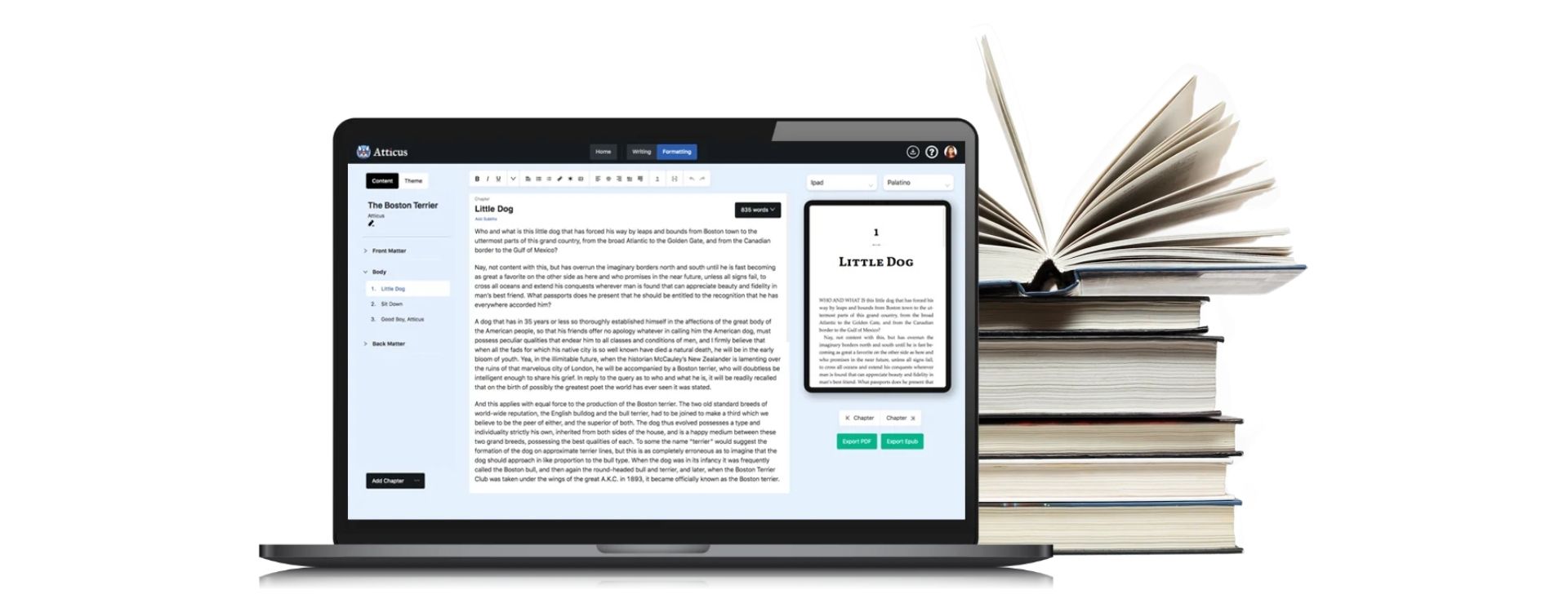
1. Atticus
Best For Indie Authors and Self-Publishers
Product Description:
Atticus is one of the best book formatting software for indie authors and self-publishers. This software simplifies your book writing and formatting process, allowing you to focus on crafting your story.
- Offers a variety of book review format options
- Includes book writing template to streamline your writing process
- Provides an easy-to-use interface for creating your book
Key Features:
- Professional book formatting templates
- Integrated book writing software
- Direct eBook publishing to Amazon
Pricing: $47/month
Pros:
- Wide variety of book formatting options
- Easy-to-use interface for beginners
- Direct publishing to Amazon eBook
Cons:
- Limited free version
- A monthly subscription can be costly for some
Why I Recommend It:
As a novice writer overwhelmed by the intricacies of book formatting, I found Atticus to be a lifesaver. Its user-friendly interface and variety of templates took the stress out of the process, and I could easily publish my book on Amazon.

2. Vellum
Best For: Professional Authors
Product Description:
Vellum is a top-tier book writing software for professional authors. It offers many advanced features to give your book a polished, professional look.
However, if you’re starting your book-writing journey, you might find its sophistication overwhelming. Don’t fret! A diverse array of software is out there tailored to beginners.
- Optimized for both eBook and print book formats
- Includes a variety of professional book-writing templates
- Allows for direct publishing to multiple eBook platforms
Key Features:
- Advanced book formatting options
- Direct eBook and print book publishing
- Wide variety of professional templates
Pricing: $199.99 one-time purchase
Pros:
- Professional-level book formatting
- One-time purchase, with no monthly subscription
- Direct publishing to multiple platforms
Cons:
- Cost may be prohibitive for some
- No free version is available
Why I Recommend It:
As an author who values professionalism and quality, I found Vellum worth every penny.
Its advanced features allowed me to create a book that rivalled those produced by the best book publishing companies.
Plus, the direct publishing feature made the whole process a breeze.

3. Kindle Create
Best For: Amazon eBook Publishers
Product Description:
Kindle Create is a free book-writing software developed by Amazon for its eBook publishers. It simplifies the process of book writing and formatting for the Kindle platform.
In 2019, Amazon’s Kindle Direct Publishing platform had over 1.4 million ebook titles available. As a beginner, Kindle Create is the best book formatting software you can choose.
This tool automatically transforms your book into a professional format, offering a variety of book writing templates.
This way, you can focus on your writing and let the tool handle the book format.
- Specifically designed for Amazon eBook publishing
- Offers a user-friendly interface and easy-to-use templates
- Provides a seamless transition from writing to publishing your book
Key Features:
- Integrated Amazon eBook formatting
- Free to use for all Amazon eBook authors
- User-friendly interface and templates
Pricing: Free
Pros:
- Specifically designed for Amazon eBook publishing
- Free to use
- User-friendly interface
Cons:
- Limited to Amazon eBook publishing
- Less advanced formatting options
Why I Recommend It:
As an Amazon eBook author, Kindle Create was my perfect tool. It simplified the book writing and formatting process, and I could easily publish my book on Amazon. Plus, it’s free!
4. MS Word
Best For: General Purpose Writing
Product Description:
Microsoft Word, while not specifically a book writing software, is yet a powerful tool that can be effectively used for writing and formatting books.
Experts believe that Microsoft Word is the most commonly used word-processing software for book formatting.
Especially for beginners, the familiarity of Word’s user interface makes it one of the best book formatting software.
Its features like spell-check, grammar check, and various book writing templates are incredibly useful.
Remember, Word is also compatible with Amazon ebook publishing, allowing you to smoothly transition from writing to publishing your book. According to a survey, 81% of self-published authors use Microsoft Word for formatting their books.
- Offers a variety of formatting options
- Includes a wide range of writing tools and templates
- Widely used and familiar to most people
Key Features:
- Advanced writing and formatting tools
- A wide array of templates
- Integrated with other Microsoft Office products
Pricing: $6.99/month Pros:
- Widely used and familiar to most
- Advanced writing and formatting tools
- Integrated with other Microsoft Office products
Cons:
- Not specifically designed for book writing
- Monthly subscription fee
Why I Recommend It:
Microsoft Word is a familiar tool to many, and its wealth of features can be effectively utilized for book writing and formatting.
While it may not have a specific focus on book writing, its versatility and wide use make it a valuable tool for any writer.
5. Scrivener
Best for: Extensive Writing Projects
Product Description:
Scrivener is one of the best book-writing software designed specifically for authors. It provides a system for managing documents, metadata and notes.
This way, the user can organize their notes, concepts, research and entire documents for easy access and reference. It offers a book format template, making it easier to create your book.
- Excellent for long writing projects
- It makes room for easy organization and management of your book content
- Offers a cork-board view for arranging content
Key Features:
- Powerful document management
- Cork-board view
- Scriptwriting format
- Easy file and image importing
Pricing: $45
Pros:
- Easy-to-use interface
- Flexible and customizable
- Excellent for creating complex manuscripts
Cons:
- The steep learning curve for beginners
- It might be too complex for simple writing tasks
Why I recommend it:
Scrivener is exceptional due to its powerful features for managing long writing projects.
Whether you’re planning a novel, research paper, or script, this software has tools that can simplify your work.
While learning might take some time, it will prove invaluable when you’re deep into a complex project. It’s the perfect software to write your book.
6. Reedsy
Best for: Collaborative Writing
Product Description:
Reedsy is a book formatting software that offers professional formatting templates.
It is an online platform that allows authors to collaborate with professional editors, designers, and marketers.
It also offers free book writing software, making it a comprehensive solution for your book publishing needs. It’s a modern take on the traditional book review format in the publishing industry.
- Easy to use, clean interface
- A variety of book-writing templates
- Offers access to professional editing services
Key Features:
- Collaborative tools for team projects
- Professional editing and design services
- Marketing and promotional tools
Pricing: Free to $10/month
Pros:
- Great for team collaborations
- Access to professional services
- Inbuilt marketplace
Cons:
- Limited formatting options
- Premium features can get expensive
Why I recommend it:
If you’re seeking a comprehensive solution that combines writing, editing, and marketing tools, Reedsy is the platform for you.
It simplifies creating, refining, and promoting your book, making it one of the best book formatting software for beginners.
7. Draft2Digital
Best for: Self-Publishing
Product Description:
Draft2Digital is a free book-writing software that also facilitates self-publishing.
It’s a book formatting software that prepares your book for publication, including conversion to various eBook formats for Amazon ebook publishing and other platforms.
- Effortless self-publishing
- Automatic conversion to multiple eBook formats
- Free ISBN assignment and book formatting services
Key Features:
- Automated eBook conversion
- Universal Book Links (UBLs)
- Free ISBNs
Pricing: Free
Pros:
- Easy to use
- Free to use
- Automated publishing process
Cons:
- Limited formatting options
- No inbuilt writing software
Why I recommend it:
Draft2Digital simplifies the eBook publishing process, making it an excellent choice for new authors.
Its automated systems take care of the technical aspects, letting you focus on the creative process. It’s one of the best novel writing software for beginners.
8. Calibre

Best for: eBook Management
Product Description:
Calibre is a powerful, open-source ebook management system that converts to and reads in various formats. It’s more than a book writing software; it’s a comprehensive eBook publishing solution.
- Supports a wide variety of formats
- Includes eBook viewer and editor
- Manage and organize your eBook library
Key Features:
- Format conversion
- eBook reader
- Metadata editor
Pricing: Free
Pros:
- Supports a large variety of formats
- Free to use
- Includes eBook viewer
Cons:
- The interface might be confusing for beginners
- Not specifically tailored for writing
Why I recommend it:
Calibre is a tool every eBook author should have. It’s excellent for managing your book library and converting between different formats. If you plan to self-publish on multiple platforms, Calibre is invaluable.
In conclusion, the best book formatting software for you will depend on your specific needs.
Whether you want an all-in-one writing and publishing platform or a simple, efficient book-writing template, a tool out there will help you create your book and get it ready for the world to see.
9. Sigil

Best for Self-Publishing Authors and Coding Enthusiasts
Product Description:
Sigil is a free book-writing software that caters to those comfortable with coding. It’s a robust EPUB editor allows you to control every detail in your book format.
- EPUB2 and EPUB3 support
- Full UTF-16 support
- Features a WYSIWYG editing mode
Key Features:
- Metadata editor
- Table of Contents generator
- Spell checking
- Book View, Code View, and Preview View modes
Pricing: Free
Pros:
- Extensive formatting control
- Multi-view modes
- Free to use
Cons:
- It may be challenging for beginners
- Requires knowledge of HTML and CSS
Why I recommend it:
Sigil is fantastic if you’re comfortable with coding. It’s not just a book formatting software but also an avenue to enhance your coding skills while creating your book. Plus, it’s free!
10. BookBaby
Best for: Independent Writers and Self-Publishers
Product Description:
BookBaby is a comprehensive platform offering various book publishing services, including book formatting. It’s your one-stop shop for all your book writing and publishing needs.
- Offers eBook and printed book services
- Easily create book review formats
- Worldwide book distribution
Key Features:
- Professional book formatting services
- Cover design
- Book printing
- ISBN services
Pricing: Varies
Pros:
- Offers a variety of services
- Professional formatting
- Helps with book format template
Cons:
- Costs can add up
- No free version is available
Why I recommend it:
If you’re an independent author looking to self-publish, BookBaby has you covered. It’s more than just book formatting software. From cover design to distribution, it provides all-around support.
11. Pressbooks
Best for: Independent Authors and Educational Writers
Product Description:
Pressbooks is a book writing software tailored to create books ready for Amazon ebook publishing and other platforms. It’s perfect for writers of all levels.
- Easy-to-use interface
- Create professional-quality Ebooks and PDFs
- Wide range of book formatting options
Key Features:
- 70+ professionally designed themes
- Import from Word, Google Docs, and others
- Export to PDF, EPUB, MOBI, and more
Pricing: From $19.99/Month
Pros:
- Easy-to-use interface
- Wide variety of export options
- Great for beginners
Cons:
- No free version beyond trial
- Some features are locked behind higher pricing tiers
Why I recommend it:
Pressbooks simplifies formatting your book for digital and print distributions, making it one of the best book-writing software for beginners. Its interface is user-friendly, and it provides plenty of export options.
12. Adobe InDesign
Best for: Professional Writers and Publishers
Product Description:
Adobe InDesign is one of the best book formatting software available in the market. It’s part of Adobe’s Creative Cloud Suite, known for its powerful features and robust capabilities. This software allows you to:
- Create a compelling book format
- Designing your book with ease and precision
- Publish your book in various formats, such as Amazon ebook publishing
Key Features:
- Professional-grade typesetting tools
- Integration with Adobe Creative Cloud
- Supports both print and digital publishing
Pricing: $20.99/month
Pros:
- High-quality output for both print and digital formats
- Wide range of tools for detailed and precise formatting
- Integration with other Adobe Creative Cloud apps
Cons:
- The steep learning curve for beginners
- Subscription-based pricing can be expensive for some
Why I recommend it:
Adobe InDesign has a reputation for being the go-to book formatting software for professionals. If you’re serious about book writing and want a tool that gives you full control over your book’s format, this software is for you.
It does come with a learning curve, but the results are worth it. What’s more, there are many tutorials and resources available to help you get started.
Choose the Best Software for Your Needs
Choosing the best book formatting software depends on your specific needs and expertise. The free book writing software may be more appealing if you’re a beginner.
However, if you’re looking for more advanced features and are okay investing, Adobe InDesign is a great option.
Remember, the goal is to create a book that resonates with your readers, and the right tool can make that process smoother and more enjoyable.
Regardless of the software you choose, remember that the book publishing journey is not just about writing; it’s about the book review format, the book format, and how well the readers receive your book.
So take your time, research, and choose the best writing software that suits your needs.
Other Book Writing Software to Consider
Beyond the best book formatting software, various resources can aid your book writing journey.
These software options cater to book format needs and publishing processes and offer free book writing templates. Let’s explore a few notable ones:
- Evernote: Evernote is a fantastic option for beginners in the book-writing realm. Pricing is $7.99 per month, making it an affordable choice. The intuitive interface and robust features make it an excellent entry point for your book-writing journey. Its user-friendly interface and free book writing software make it one of the best book formatting software for those starting. Whether you’re jotting down your first thoughts or publishing an Amazon ebook, Evernote has covered you.
- Notion: Notion is a versatile book-writing software that’s great for beginners. Pricing is $4 monthly, but they also offer a free version. The interface is friendly to use for beginners, which makes it an excellent choice as a beginner book writing software. Its user-friendly interface and book writing template makes it easy to create your book in a professional format. Plus, it’s one of the best free book-writing software options out there!
Whether you want to publish your book traditionally or delve into ebook publishing, software like these can help ease the process.
Remember, the best writing software will cater to your specific needs and enhance your writing process.
Note: Each software has its strengths and weaknesses, so it’s essential to consider what specific tools and features you need. Do you need a novel writing format?
Or are you looking for the best novel writing software free of charge? Answering these will help you make an informed choice.
What I Like/Dislike About Free Book Formatting Software
Free book formatting software offers a cost-effective solution for beginners venturing into self-publishing. Its easy-to-use interface provides a friendly introduction to the terrain of book publishing. However, it does come with its own set of limitations and potential pitfalls.
Pros
- It’s free, allowing you to format your book without incurring any upfront costs.
- Many free book formatting software options are user-friendly, catering to those who may not be tech-savvy.
Cons
- Free software may need more features and customization options compared to paid alternatives.
- Reliability and user-friendliness can be inconsistent.
- Some free software may have hidden fees or limitations unbeknownst to the user.
While free book formatting software can be a great starting point for beginners, you should also consider the possible limitations, as with any other free resources.
Choosing the best book formatting software will ultimately hinge on your specific needs, budget, and familiarity with self-publishing.
What is the format for exporting eBooks?
Demystifying the world of ebooks starts with understanding the right formatting for exporting them. The best book formatting software can be your gateway to publishing success.
This process often seems intimidating to beginners, but with the right tools, it can be as easy as typing your book on your favourite writing software.
Whether you’re self-publishing your first novel, creating a recipe book, or sharing your life’s journey, the format of your ebook plays a crucial role in how your readers experience your work.
- EPUB:
This is a widely accepted ebook format. Software like the best book writing software, Scrivener, and many others, offer EPUB formatting, which is compatible with various e-readers.
Particularly, it shines because of its flexibility to adapt to different screen sizes. This makes it a top choice for Amazon ebook publishing.
If you’re a beginner, opting for a book formatting software that supports EPUB can create a smoother journey for your book publishing process.
- MOBI:
Specifically for Amazon ebook publishing, this format works seamlessly with Kindle devices. You can easily create a book in MOBI format using free book writing software like Kindle Create.
If you’re a beginner looking for the best book formatting software, Kindle Create is a solid choice.
Its user-friendly interface and intuitive book-writing template make it a top contender in the realm of the best book-writing software.
- PDF:
Not traditionally considered an ebook format, but used widely for its layout preservation characteristics.
Many use Adobe InDesign, one of the best novel writing software for this. Additionally, there are a plethora of free book-writing software choices that support PDFs.
Howbeit, it’s important to remember that while PDF maintains format integrity, there are better choices for Amazon ebook publishing, which prefers MOBI format.
What is the Best Premium Book Formatting Software?
Whether you’re a novice writer or an experienced author, you understand the importance of a well-formatted book in publishing.
Scrivener is the best book formatting software among various book publishing software available, especially for beginners. Let’s delve into what makes Scrivener the go-to choice for many writers.
- Scrivener is incredibly user-friendly, making it easy to create your book without stress.
- It offers a comprehensive book writing template which aids in maintaining a consistent book format.
- Scrivener provides a seamless book-writing process with its robust book-writing software.
- It supports the Amazon ebook publishing format, making it a breeze to publish your book.
Consider this scenario. You’re a new author with a fantastic idea for a novel. You’ve done your research, and you’ve written an outline.
Now, it’s time to write your book. You open Scrivener, immediately greeted with a user-friendly interface to make your book-writing process smooth and efficient.
With Scrivener’s book writing template, you can effortlessly maintain a consistent book format throughout your novel.
Scrivener’s compatibility with Amazon’s ebook publishing format makes it easy to choose the best book formatting software when you’re ready to publish.
What is the Best Free Book Formatting Software?
The best book formatting software can be a game-changer for beginners in book publishing.
You can effortlessly convert your manuscript into a beautifully formatted book with the right tool.
One exceptional software that stands out, especially for those on a budget, is Google Docs. Yes, you heard that right! This free software offers various features that can help shape your book perfectly.
- Book Writing Template: Google Docs offers a variety of templates to get you started. You can choose one that fits your book format and instantly begin writing.
- Free Book Writing Software: As a free tool, Google Docs is a cost-effective solution for starting authors or those seeking a budget-friendly option.
- Collaboration and Sharing: Working with a team? No problem! You can easily share your book with others for editing or reviewing. This makes it a great tool for collaborative book writing.
- Format Flexibility: Whether writing an eBook or preparing for print, Google Docs supports various formats. You can even export your work in the Amazon book format for easy publishing.
While Google Docs is incredibly versatile, it’s not the only player in the game.
Other popular free book formatting software options include Scrivener’s free trial and Reedsy’s book editor.
Both offer excellent formatting features but with a more focused approach to book writing and publishing.
FAQ: Best Book Formatting Software for Beginners
Which software is used for book formatting?
There are numerous software options available for book formatting. The most popular ones include Scrivener, Reedsy, and Vellum. However, for beginners stepping into book writing and publishing, Microsoft Word remains the go-to choice. It’s simple, familiar, and offers many features to create your book format.
What is the best software for making a book?
The ‘best’ software for making a book can vary based on your needs. For instance, Scrivener is often hailed as the best novel writing software due to its comprehensive features. On the other hand, Microsoft Word is a universal favourite for its simplicity and accessibility. For those looking for free book-writing software, Google Docs is a great option too.
What is the best software to format children’s books?
Regarding children’s book formatting software, Kindle Kids’ Book Creator from Amazon ebook publishing stands out. It’s user-friendly and specifically designed for children’s books. Other good options include Blurb and BookWright, which offer beautifully designed templates to spark creativity.
What is the best format to write a book in?
The best format to write a book majorly depends on your publishing platform. For instance, ePub is preferred for most ebook publishing, while Amazon prefers MOBI for Kindle. PDF is a universal format used for both print and digital. However, to start writing, many authors prefer the simplicity of a Word Document or Google Docs.
Is there a book format on Microsoft Word? Does Microsoft Word have a book format?
Yes, Microsoft Word does offer a book format. You can create your book using Word’s built-in templates or customize your own. The software provides wide margins, chapter breaks, a table of contents, and more. It’s a great tool for beginners due to its ease of use.
Where can I format my book?
You can format your book using various book formatting software available online. Some options include Scrivener, Vellum, and the Reedsy Book Editor. If you prefer a more hands-on approach, Microsoft Word and Google Docs allow you to format your book manually. Many of these tools also offer book formatting services for an additional fee.
How do I format a PDF book?
PDF books can be formatted using Adobe Acrobat. This software lets you adjust the layout, font, and spacing to suit your book format. Alternatively, free software like Google Docs and Microsoft Word can export your document as a formatted PDF.
Which software is used for brushes and layout of books?
Adobe InDesign is typically used for complex book layouts and offers a range of brushes for creative design. However, for beginners, Canva is a great alternative. It offers a variety of brushes and layout options, and it’s user-friendly.
How do you create a book format?
Creating a book format involves several steps. First, decide on the size of your book and set your page size accordingly. Next, set your margins and line spacing. Then, design your headers and footers and set up proper page numbers. Lastly, create your title page, table of contents, and chapter headings. Software like Scrivener and Microsoft Word can simplify this process with their book-writing templates.
What is the best free ebook formatter?
The best free ebook formatter is arguably the Reedsy Book Editor. Not only does it provide advanced formatting options, but it also offers a clean, distraction-free writing environment. Additionally, it automatically exports your book into ePub format, ready for ebook publishing.